

Distributed systems are something that keeps coming up the more I learn about being a software developer. As it is clearly very important, I thought I should learn more about them. Speaking to people in Tesco about things I need to learn, I have got a potentially random list of terms I wanted to learn more about, so here they are!
What is a Distributed System
A distributed system, also known as distributed computing, is a system with multiple components located on different machines that communicate and coordinate actions in order to appear as a single coherent system to the end-user.
https://blog.stackpath.com/distributed-system/
So basically a distrbuted system as a network of little applications coming together to make one bigger program. Lets take Netflix for example. Netflix requires everything from login functionality, user profiles, recommendation engines, personalization, relational databases, object databases, content delivery networks, and numerous other components all served up cohesively to the user. All these individual parts are handled separately and brought toghether into one distributed system for the user.

Why use a Distributed System
There are three main reasons why most companies are moving towards distributed systems:
- Horizontal Scalability—Since computing happens independently on each node, it is easy and generally inexpensive to add additional nodes and functionality as necessary.
- Reliability—Most distributed systems are fault-tolerant as they can be made up of hundreds of nodes that work together. The system generally doesn’t experience any disruptions if a single machine fails.
- Performance—Distributed systems are extremely efficient because work loads can be broken up and sent to multiple machines.
Here is another good resource on the positives and challenges of distributed systems.
CAP Theorum
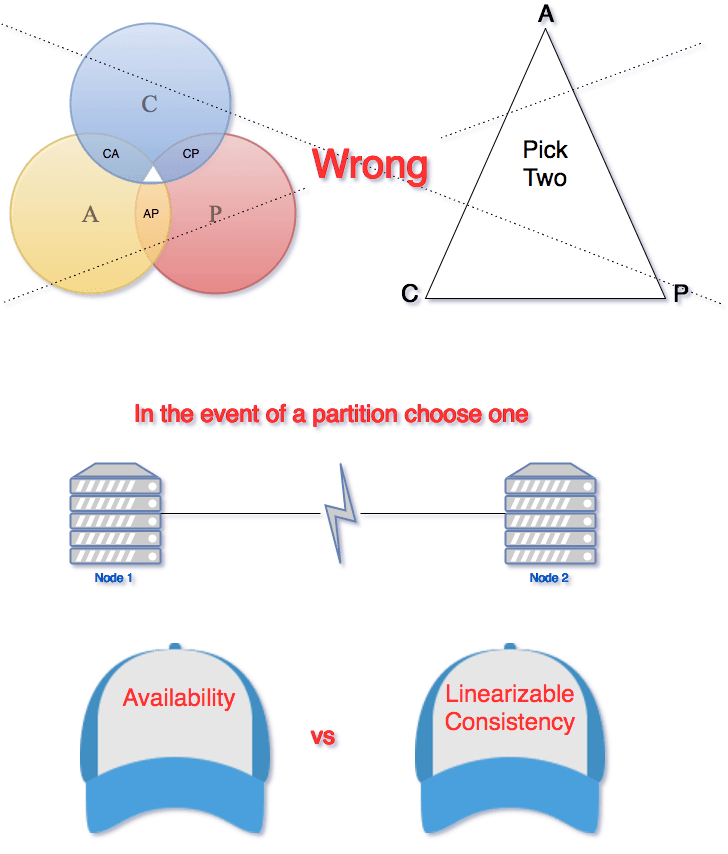
CAP Theorum is a theorum that applies to any distributed system that stores state. Eric Brewer, at the 2000 Symposium on Principles of Distributed Computing (PODC), argued that in any networked shared-data system there is a fundamental trade-off between consistency, availability, and partition tolerance. The theorem states that networked shared-data systems can only guarantee/strongly support two of the following three properties:
- Consistency — A guarantee that every node in a distributed cluster returns the same, most recent, successfully written data. Consistency refers to every client having the same view of the data.
- Availability — Every non-failing node returns a response for all read and write requests in a reasonable amount of time. The key word here is every.
- Partition Tolerant — The system continues to function and upholds its consistency guarantees in spite of network partitions. Network partitions are when the network connection between two nodes is lost, and they are a fact of life. Distributed systems guaranteeing partition tolerance can gracefully recover from partitions once the partition heals.
This means there are three types of potential distributed system:
CP database: A CP database delivers consistency and partition tolerance at the expense of availability. When a partition occurs between any two nodes, the system has to shut down the non-consistent node (i.e., make it unavailable) until the partition is resolved.
AP database: An AP database delivers availability and partition tolerance at the expense of consistency. When a partition occurs, all nodes remain available but those at the wrong end of a partition might return an older version of data than others. (When the partition is resolved, the AP databases typically resync the nodes to repair all inconsistencies in the system.)
CA database: A CA database delivers consistency and availability across all nodes. It can’t do this if there is a partition between any two nodes in the system, however, and therefore can’t deliver fault tolerance.
https://www.ibm.com/cloud/learn/cap-theorem
Due to Network Partitions being a case of when and not if, having a CA database is more theoretical than literal. CAP theorum is really letting you know that in the event of a Network Partition, you need to chose either Consistency or Availability.
ACID Transactions
Guaranteeing ACID transactions in distributed systems is challenging.
What are ACID Transactions
ACID refers to the four key properties of a database transaction: atomicity, consistency, isolation, and durability.
- Atomicity – All changes to data are performed as if they are a single operation. That is, all the changes are performed, or none of them are.
- Consistency – Data is in a consistent state when a transaction starts and when it ends.
- Isolation – The intermediate state of a transaction is invisible to other transactions. As a result, transactions that run concurrently appear to be serialized.
- Durability – After a transaction successfully completes, changes to data persist and are not undone, even in the event of a system failure.
Guaranteeing Atomicity in a distributed system can be tough, as you need all of the nodes to have all of the changes.

Relational and Non-Relational Databases
Relational databases like MySQL, PostgreSQL and SQLite3 represent and store data in tables and rows. They’re based on a branch of algebraic set theory known as relational algebra. Meanwhile, non-relational databases like MongoDB represent data in collections of JSON documents.
https://www.pluralsight.com/blog/software-development/relational-non-relational-databases
Relational Databases are better if your database is going to be handling complicated queryies, transactions and routine analysis of data. ACID really matters if you are going to be lots of database transactions.
Non-relational databases just store data without explicit and structured mechanisms to link data from different tables (or buckets) to one another. This means there are less problems with ORM (Object Relational Mapping) errors. ORM errors happen when you are using an Object Oriented Programming language, and you have to do conversions when storing and retrieving data in a relational database.
Another reason why Non-relational databases are useful is they have flexible schemas. The schema is basically the blueprint for information stored in the database. In a Relational database, which is just a table of data, all records have to have the same schema. However in a non-relational database, the schema is flexible and can be different for documents saved in the same collection.
The downside to non-relational databases is there is no way to link them together, unlike relational databases and the concept of foreign keys. You have to create multiple queries and link them together yourself. Also they do not have the concept of transactions. A database transaction is the whole process of making a change to the database:
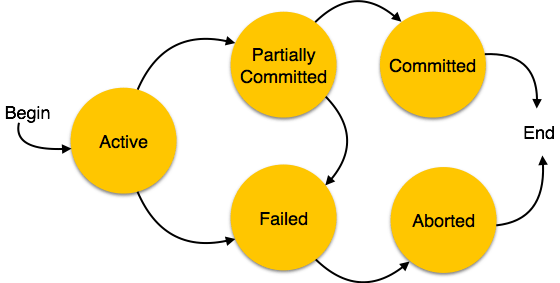
In relational databases, having transactions helps ensure ACIDity, which is tougher in a non-relational database.
Relational and non-relational databases are also known as SQL and NoSQL databases, named for the language used to query relational databases.
tldr summary: SQL databases are known as relational databases, and have a table-based data structure, with a strict, predefined schema required. NoSQL databases, or non-relational databases, can be document based, graph databases, key-value pairs, or wide-column stores. NoSQL databases don’t require any predefined schema, allowing you to work more freely with “unstructured data.” Relational databases are vertically scalable, but usually more expensive, whereas the horizontal scaling nature of NoSQL databases is more cost-efficient.
https://www.mongodb.com/scale/nosql-vs-relational-databases
Concurrency Control
Concurrency control ensures that correct results for concurrent operations are generated, while getting those results as quickly as possible.
Optimistic Concurrency Control
Optimistic concurrency control (OCC) is a concurrency control method applied to transactional systems such as relational databases, and assumes that multiple transactions can frequently complete without interfering with each other. Because they don’t interfere with eachother, the transactions don’t aquire locks on the database, which makes it faster to complete as multiple transactions can be completed at once. Optimistic concurrency control transactions involve these phases:
- Begin: Record a timestamp marking the transaction’s beginning.
- Modify: Read database values, and tentatively write changes.
- Validate: Check whether other transactions have modified data that this transaction has used (read or written). This includes transactions that completed after this transaction’s start time, and optionally, transactions that are still active at validation time.
- Commit/Rollback: If there is no conflict, make all changes take effect. If there is a conflict, resolve it, typically by aborting the transaction.
Pessimistic Concurrency Control is the opposite, where the database is locked by each transaction until it finishes.
Race Conditions
A race condition occurs when two or more threads can access shared data and they try to change it at the same time. Because the thread scheduling algorithm can swap between threads at any time, you don’t know the order in which the threads will attempt to access the shared data. Therefore, the result of the change in data is dependent on the thread scheduling algorithm, i.e. both threads are “racing” to access/change the data. Here is an example:
We have some data, X. Two threads want to access that data at the same time. Both of them check the data at the start, and X = 10.
// Thread 1
X + 5

// Thread 2
X * 2
If thread 2 completes first, then X should be 20, however when Thread 1 checked X it was still 10, so X becomes 15 when Thread 1 completes.
To avoid race conditions, often threads will put a lock on data they are accessing. This means that Thread 1 would have locked X until it had completed, so Thread 2 would have to wait for the lock to release before checking the value and completing its own function.
I found this stack overflow thread useful for providing information.
Eventual Consistency
Eventual consistency is a consistency model used in distributed computing to achieve high availability that informally guarantees that, if no new updates are made to a given data item, eventually all accesses to that item will return the last updated value. Eventually consistent systems are often referred to as providing BASE (Basically Available, Soft state, Eventual consistency), which is easy to remember as the opposite to ACID.
- (B)asically (A)vailable: basic reading and writing operations are available as much as possible (using all nodes of a database cluster), but without any kind of consistency guarantees (the write may not persist after conflicts are reconciled, the read may not get the latest write)
- (S)oft state: without consistency guarantees, after some amount of time, we only have some probability of knowing the state, since it may not yet have converged
- (E)ventually consistent: If the system is functioning and we wait long enough after any given set of inputs, we will eventually be able to know what the state of the database is, and so any further reads will be consistent with our expectations
A system that has achieved eventual consistency is often said to have converged, or achieved replica convergence. In order to ensure replica convergence, a system must reconcile differences between multiple copies of distributed data. This consists of two parts:
- exchanging versions or updates of data between servers (often known as anti-entropy)
- choosing an appropriate final state when concurrent updates have occurred, called reconciliation.
The most appropriate approach to reconciliation depends on the application. A widespread approach is “last writer wins”, where the latest write to any of the database nodes is assumed to be the correct piece of data to converge on.
Load Balancers
Load balancing is the process of distributing network traffic across multiple servers. This ensures no single server bears too much demand. By spreading the work evenly, load balancing improves application responsiveness. It also increases availability of applications and websites for users.
https://avinetworks.com/what-is-load-balancing/
So basically, load balances allow you to spin up multiple servers to responds to queries rather than relying on one server to handle all the traffic. Each node may have its own database which is where all the stuff I talked about above comes into play.
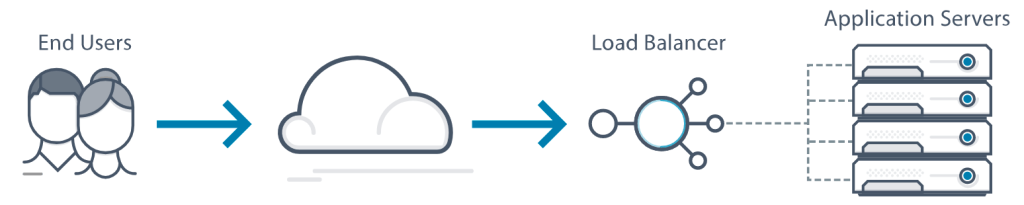
There is a variety of load balancing methods, each suited for particular situations:
- Least Connection Method — directs traffic to the server with the fewest active connections. Most useful when there are a large number of persistent connections in the traffic.
- Least Response Time Method — directs traffic to the server with the fewest active connections and the lowest average response time.
- Round Robin Method — rotates servers by directing traffic to the first available server and then moves that server to the bottom of the queue. Most useful when servers are of equal specification and there are not many persistent connections.
- IP Hash — the IP address of the client determines which server receives the request.
Load balancers have different capabilities, which include:
- L4 — directs traffic based on data from network and transport layer protocols, such as IP address and TCP port.
- L7 — adds content switching to load balancing. This allows routing decisions based on attributes like HTTP header, uniform resource identifier, SSL session ID and HTML form data.
- GSLB — Global Server Load Balancing extends L4 and L7 capabilities to servers in different geographic locations.
Typically load balancers allow you to define how many nodes you would like to have running at once. If a node goes down for any reason, a load balancer can automatically start up a new node for you to ensure you always have your specified minimum amount. This allows you to scale your service quickl and easily to meet any surges in demand.
Here is another useful resource about load balancing.
Scaling
Scaling in the context of a distributed system is growing your capability to deal with larger amounts of traffic or data or whatever you need. There are two types of scaling; Horizontal and Vertical.
Horizontal scaling means that you scale by adding more machines into your pool of resources whereas Vertical scaling means that you scale by adding more power (CPU, RAM) to an existing machine.
Vertical scaling is useful as it requires no changes to your code, however it is limited by the resources of the machine. Horizontal scaling allows you to scale much wider, however it takes time and work to ensure the servers work together properly.
Load balancers help you to scale automatically.
Proxies
A proxy, proxy server, or web proxy, is a server that sits in front of a group of client machines. When those computers make requests to sites and services on the Internet, the proxy server intercepts those requests and then communicates with web servers on behalf of those clients, like a middleman.
https://www.cloudflare.com/learning/cdn/glossary/reverse-proxy/
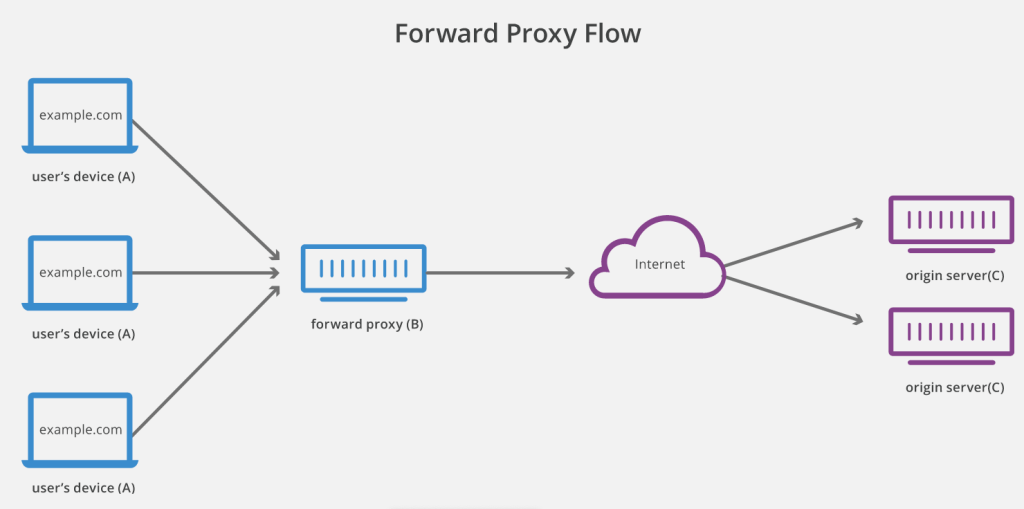
There are a few reasons one might want to use a forward proxy:
- To avoid state or institutional browsing restrictions – Some governments, schools, and other organizations use firewalls to give their users access to a limited version of the Internet. A forward proxy can be used to get around these restrictions, as they let the user connect to the proxy rather than directly to the sites they are visiting.
- To block access to certain content – Conversely, proxies can also be set up to block a group of users from accessing certain sites. For example, a school network might be configured to connect to the web through a proxy which enables content filtering rules, refusing to forward responses from Facebook and other social media sites.
- To protect their identity online – In some cases, regular Internet users simply desire increased anonymity online, but in other cases, Internet users live in places where the government can impose serious consequences to political dissidents. Criticizing the government in a web forum or on social media can lead to fines or imprisonment for these users. If one of these dissidents uses a forward proxy to connect to a website where they post politically sensitive comments, the IP address used to post the comments will be harder to trace back to the dissident. Only the IP address of the proxy server will be visible.
A reverse proxy is a server that sits in front of one or more web servers, intercepting requests from clients. This is different from a forward proxy, where the proxy sits in front of the clients. With a reverse proxy, when clients send requests to the origin server of a website, those requests are intercepted at the network edge by the reverse proxy server. The reverse proxy server will then send requests to and receive responses from the origin server.
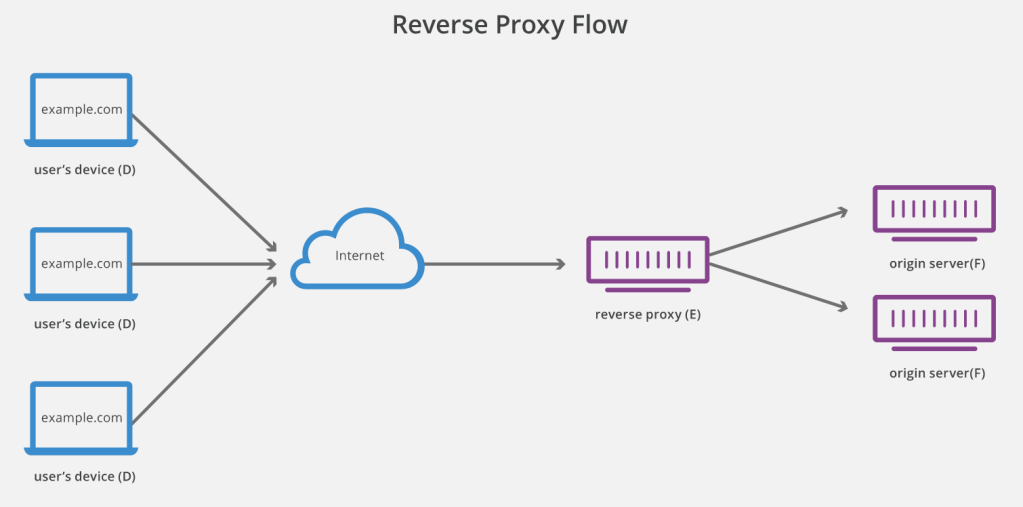
Some of the benefits of a reverse proxy are:
- Load balancing – A reverse proxy can provide a load balancing solution, including GSLB.
- Protection from attacks – With a reverse proxy in place, a web site or service never needs to reveal the IP address of their origin server(s). This makes it much harder for attackers to leverage a targeted attack against them, such as a DDoS attack. Instead the attackers will only be able to target the reverse proxy, which will have tighter security and more resources to fend off a cyber attack.
- Caching – A reverse proxy can also cache (temporarily save) content, resulting in faster performance. For example, if a user in England visits a reverse-proxied website with web servers in Los Angeles, the user might actually connect to a local reverse proxy server in England, which will then have to communicate with an origin server in L.A. The proxy server can then cache the response data. Subsequent users in England who browse the site will then get the locally cached version from the English reverse proxy server, resulting in much faster performance.
- SSL encryption – Encrypting and decrypting SSL (or TLS) communications for each client can be computationally expensive for an origin server. A reverse proxy can be configured to decrypt all incoming requests and encrypt all outgoing responses, freeing up valuable resources on the origin server.
Encryption is a way of scrambling data so that only authorized parties can understand the information.
SSL initiates an authentication process called a handshake between two communicating devices to ensure that both devices are really who they claim to be.
TLS encrypts the communication between web applications and servers, it is an update to SSL.
DNS
The Domain Name System (DNS) is the phonebook of the Internet. Humans access information online through domain names, like nytimes.com or espn.com. Web browsers interact through Internet Protocol (IP) addresses. DNS translates domain names to IP addresses so browsers can load Internet resources.
https://www.cloudflare.com/learning/dns/what-is-dns/
Every device that connects to the internet is given a unique IP address using either IPv4 or IPv6.
IPv4 uses a 32-bit address for its Internet addresses. That means it can provide support for 2^32 IP addresses in total around 4.29 billion. For example – 192.168.1.1
IPv6 utilizes 128-bit Internet addresses. Therefore, it can support 2^128 Internet addresses—340,282,366,920,938,463,463,374,607,431,768,211,456 of them to be exact. The number of IPv6 addresses is 1028 times larger than the number of IPv4 addresses. For example 2400:cb00:2048:1::c629:d7a2
IP adresses are what computers use to communicate, acting a bit like a home adress for an internet device or server. DNS translates the IP adderss into a human readable domain name, so we don’t have to remember a seemingly random assortment of numbers and letters. Here is the flow between different DNS servers to resolve a hostname:
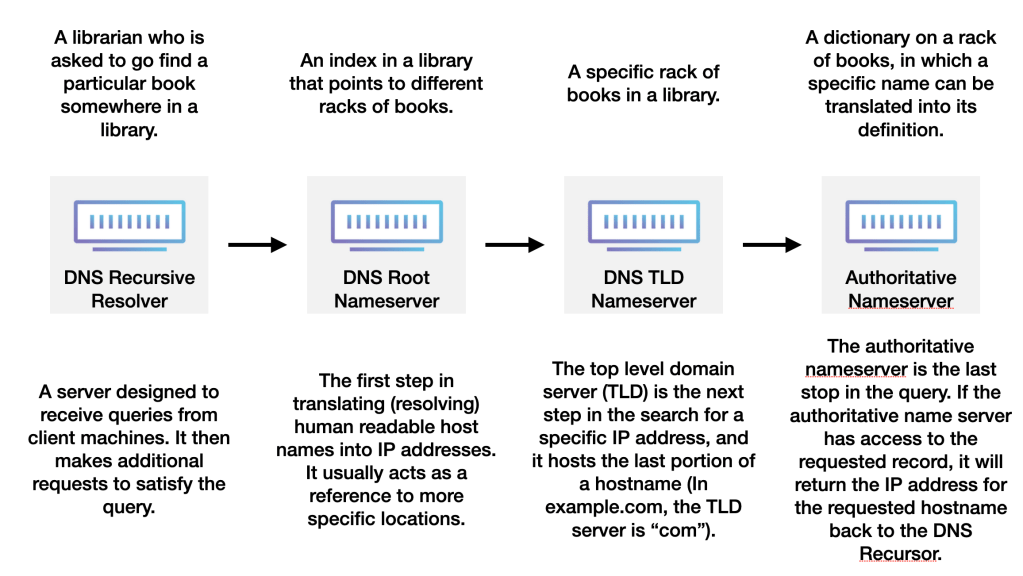
The 8 steps in a DNS lookup:
- A user types ‘example.com’ into a web browser and the query travels into the Internet and is received by a DNS recursive resolver.
- The resolver then queries a DNS root nameserver (.).
- The root server then responds to the resolver with the address of a Top Level Domain (TLD) DNS server (such as .com or .net), which stores the information for its domains. When searching for example.com, our request is pointed toward the .com TLD.
- The resolver then makes a request to the .com TLD.
- The TLD server then responds with the IP address of the domain’s nameserver, example.com.
- Lastly, the recursive resolver sends a query to the domain’s nameserver.
- The IP address for example.com is then returned to the resolver from the nameserver.
- The DNS resolver then responds to the web browser with the IP address of the domain requested initially.
Once the 8 steps of the DNS lookup have returned the IP address for example.com, the browser is able to make the request for the web page: - The browser makes a HTTP request to the IP address.
- The server at that IP returns the webpage to be rendered in the browser (step 10).
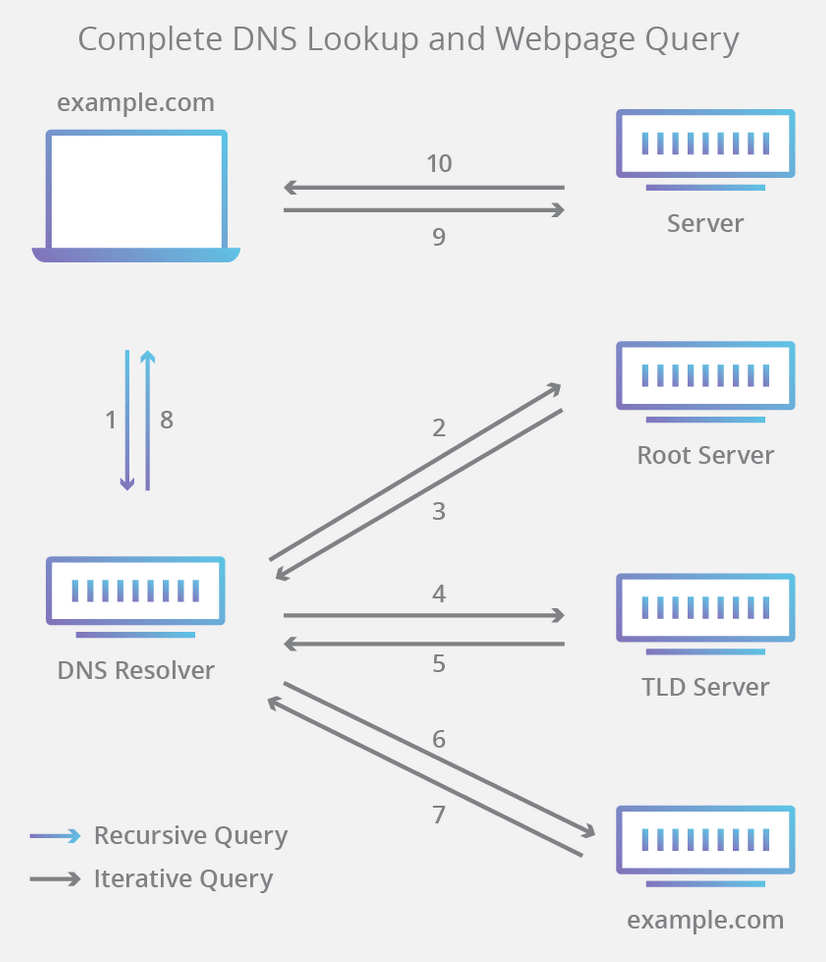
3 types of DNS queries:
- Recursive query – In a recursive query, a DNS client requires that a DNS server (typically a DNS recursive resolver) will respond to the client with either the requested resource record or an error message if the resolver can’t find the record.
- Iterative query – in this situation the DNS client will allow a DNS server to return the best answer it can. If the queried DNS server does not have a match for the query name, it will return a referral to a DNS server authoritative for a lower level of the domain namespace. The DNS client will then make a query to the referral address. This process continues with additional DNS servers down the query chain until either an error or timeout occurs.
- Non-recursive query – typically this will occur when a DNS resolver client queries a DNS server for a record that it has access to either because it’s authoritative for the record or the record exists inside of its cache. Typically, a DNS server will cache DNS records to prevent additional bandwidth consumption and load on upstream servers.
I think that is enough for one post, I have lots more that I want to learn about and will therefore be putting in future blogs, but they may not be as relevant to distributed systems.
You can find the list of all of my Knowledge Sharing posts here.
 Josh's Blog

One thought on “Distributed System Design”