

I recently had to create a set of RESTful APIs as part of my apprenticeship. REST is an acronym that gets thrown around a lot by software devs, so I thought it would be good to do a blog about what that actually means.
What is REST
REST stands for Representational State Transfer, and it is a development style that defines constraints for creating web services. Being RESTful means you conform to the REST standards. RESTful APIs should allow you to access and change resources. This is usually done over HTTP using HTTP methods like GET, POST, PATCH etc. RESTful APIs should be stateless, which makes them fast, reliable, and easily scaleable.
Accessing an API is done by sending a request to a URL endpoint. The request is made up of four main parts:
- The endpoint – the url you are sending the request to. This may have more information inline.
- The method – GET for example, the method will determine what operation is being performed at the endpoint.
- The headers – Headers are sent with the request and can contain useful information, such as content type.
- The body – Data can be sent in the body depending on the type of request.
Here is an example you can use in the command line, using the curl command to retrieve a status code:
curl --write-out %{http_code} --silent --output /dev/null -X GET https://api.github.com -H 'accept-language: en-GB'
--write-out %{http_code} --silent --output /dev/null is just going to write the HTTP status code to the command line so isn’t important for the call itself.GET is the HTTP method we are using in the request.https://api.github.com is the endpont we are sending the request to.-H 'accept-language: en-GB' is setting a header called accept-language to the value en-GB.
As this is a GET request, we are not sending a body. To send a body with the request, you would add the following:--data '{"username":"xyz","password":"xyz"}'
The Endpoint
The endpoint that you are trying to reach, there are a few conventions around naming for restful endpoints. Generally you would want the HTTP method to be determining what operation is happening rather than having lots of different endpoints. For example:
BAD
GET /employees– Retrieves a list of employeesGET /getEmployee/12– Retrieves a specific employeePOST /addEmployee– Creates a new employeePUT /updateEmployee/12– Updates employee 12PATCH /– Partially updates employee 12updateEmployee/12DELETE /deleteEmployee/12– Deletes employee 12
GOOD
GET /employees– Retrieves a list of employeesGET /employees/{id}– Retrieves a specific employeePOST /employees– Creates a new employeePUT /employees/{id}– Updates employee matching idPATCH /employees/{id}– Partially updates employee matching idDELETE /employees/{id}– Deletes employee matching id
As you can see this is much neater and clearer for the user.
Then if there was something associated with the employee, such as a card balance, you could add that on:
GET /employees/{id}/card-balance
If you want to filter and sort the resources returned, you could add a parameter to the url:
GET /employees?location=UK&sort=name
The API may even allow you to only request certain fields be returned in the response:
GET /employees?fields=name,id
Using a plural name such as employees denotes that there are multiple resources under this endpoint. If it were employee you would expect only one resource to be returned. In the example below, employees contains multiple employees, we get one of those by passing an id, then we retrieve the single card-balance.
GET /employees/{id}/card-balance
Multiple words in the route should be seperated by a hyphen, such as card-balance.
The Method
There are 5 main HTTP methods you can use:
GET – Used to read information from a server.
POST – Used to create a new resource on a server.
PUT – Used to update a resource on a server.
PATCH – Used to update a resource on a server.
DELETE – Used to remove a resource from a server.
PUT vs POST – Generally you will use PUT to replace a resource with an updated version of it, whereas PATCH will only update part of the resource.
There are more methods, but they are used much less often. You can read about them here.
The Headers
Headers are used to provide information to both the client and the server. One common example is
Content-Type: application/json
Which tells the API what format of response you would like, or the format of data you are sending. Another common header is
Authorization: "authToken"Which is used to verify someone has the right authorisation to view a resource.
The Body
A body (or data) is only sent with POST, PUT, PATCH or DELETE methods. You should not send a body with a GET request. You can send the data in a number of formats, I’ve mainly used json, and you normally have to specify the format in the header using the Content-Type header as above.
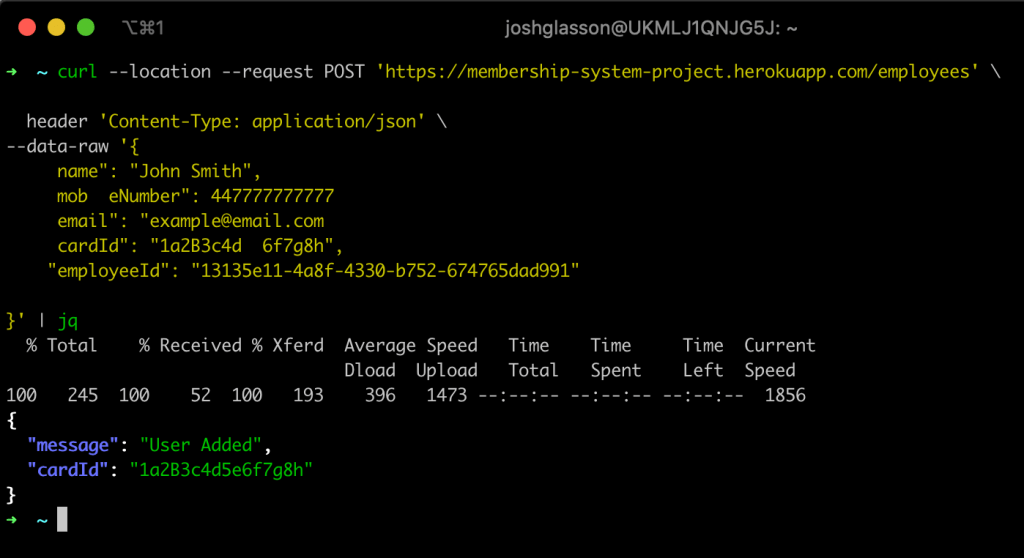
jq to format the json response and make it look pretty.Here is an example of a full request to an API which I worked on for a project:
Hopefully you can see all the parts of the request being sent.
These two are good resources for REST API conventions:
https://www.restapitutorial.com/
https://nordicapis.com/10-best-practices-for-naming-api-endpoints/
Response Codes
When sending responses, you need to make sure that you are sending the correct response code back. Wikipedia has a good list of status codes and generally when to use them, although I prefer this site.

You can find the list of all of my Knowledge Sharing posts here.
 Josh's Blog
One thought on “REST API’s”