

Presentation Prep
Today was all about preparing our presentation for tomorrow. This meant making sure everything was working as it should and recording a walkthrough of our website.
This meant a bit of bug fixing.
Delete Fixtures
This is actually one I fixed yesterday but forgot to mention. When a fixture is added, it is actually added to two databases. The fixtures database and the calendar database. The calendar database exists solely to provide information to the calendar. The Fixture ID is also used in the availability table, so a player can be linked to a specific game.
All these tables being connected led to bugs we hadn’t caught previously, but I noticed while playing around with the website.
Problem One
The first was that if someone had ticked they were available for a game, trying to delete that fixture would not work. The website would do nothing, and in the terminal an SQL error would appear. The error stated that the fixture could not be deleted as the ID was still being referenced by another table.
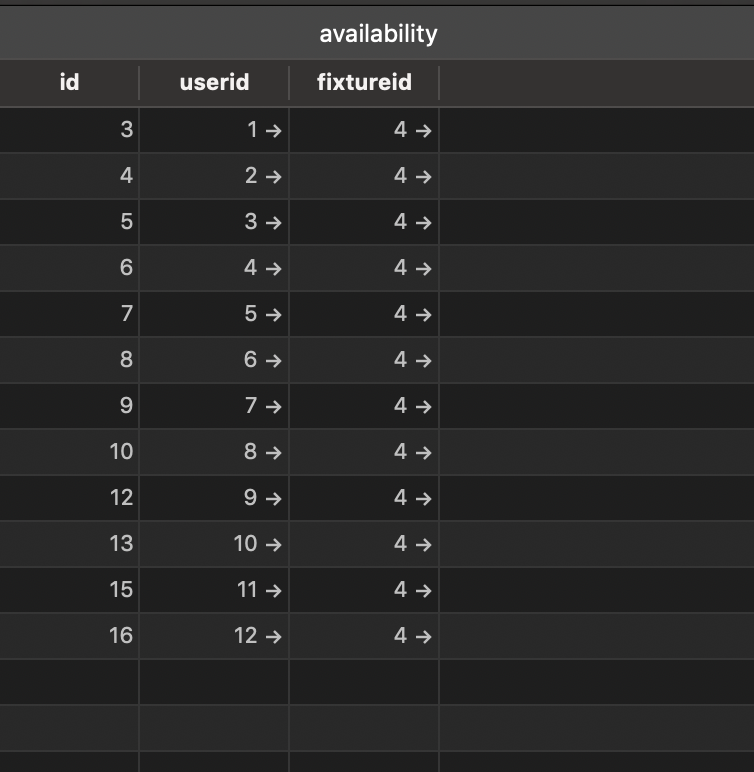
To fix this we would have to delete any entries in availability linked to that ID. I had a feeling we would be able to do this with the API, with a similar method to something we had already used a lot. The API allows you to do searches if you enter them into the repository first. For example we can find all users by their teamid, using this code in the repository.
List<User> findByTeamid(Long teamid);
That gives us the ability to use searches in our API.

If we went to http://localhost:8080/api/users/search/findByTeamid?teamid=1, all the users in that team would be returned:

Knowing this, I had a feeling that we could replace find with delete, and use our API to delete by fixture ID instead. I put this code into the repository:
List<Availability> deleteByFixtureid(Long fixtureid);
And tried to visit http://localhost:8080/api/availabilities/search/deleteByFixtureid?fixtureid=2 manually to see if it worked, which it did, all the entries with that fixture ID were deleted! Now I just had to get it into my code.
This would only ever need to happen when a fixture was deleted, so I went to that part of the code and started there. We had done plenty of fetches to the API so I just used the same method as usual, although I didn’t need a response so didn’t need to add any of the usual stuff converting it to JSON.
fetch('/api/availabilities/search/deleteByFixtureid?fixtureid='+ this.state.fixtureid)
this.state.fixtureid was already defined so was easy to add in. At first this didn’t work, but after some googling, I found I had to add @Transactional to my repository above the deleteBy code to get it to work, which it then did! Problem one solved!
Problem Two
The second problem was that deleting fixtures didn’t remove them from the calendar database. When a fixture is added it is put into both databases separately, with only some information going into the calendar, and in a different format. When we deleted fixtures however it was originally only removing from the fixtures database, so the calendar would show all fixtures that had been created.
Deleting them from the database would be easy now I had figured out how to do it with availability, except we never actually associated the calendar entries with a fixture ID, so there was no way of search for a specific fixture in the calendar!
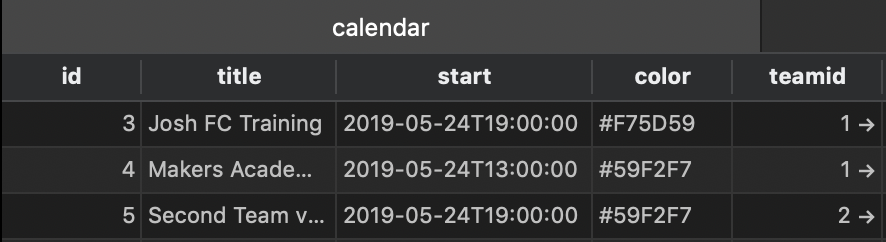
So, to fix this we would just need to put fixture ID into the database at the point of creation, which would be easy right?
Wrong! The fixture ID is generated when the fixture is POSTed to the API, and at this point we had no way of knowing what it was going to be. We had managed to get it previously by using team ID and other things to search the database, but we couldn’t use that here!
I started by looking at the fetch request we used for POSTing to the API. Unlike with our GET fetches, we were not getting a response:
// GET

fetch('API', {method: 'GET'}).then((response) => {return response.json()}).then((json) => {'DO STUFF WITH JSON DATA'});

// POST

fetch('API', {method: 'POST'},
body: JSON.stringify({'STUFF TO POST})});
As you can hopefully see above, GET goes to the API, gets information as a response, then converts it to JSON data, which we then use to do stuff. POST on the other hand just sends data over to the API, and gets nothing back in return.
I figured that something must come back, so I added in the .then((response) => {}) bit and printed out the response with console.log(response). Sure enough, there was a response coming back.

Although there was no data for me to use it was a good start. I looked in the Network tab of Chrome Dev Tools to see if there was anything useful there, and found our POST request. In there, I found exactly what I was looking for:
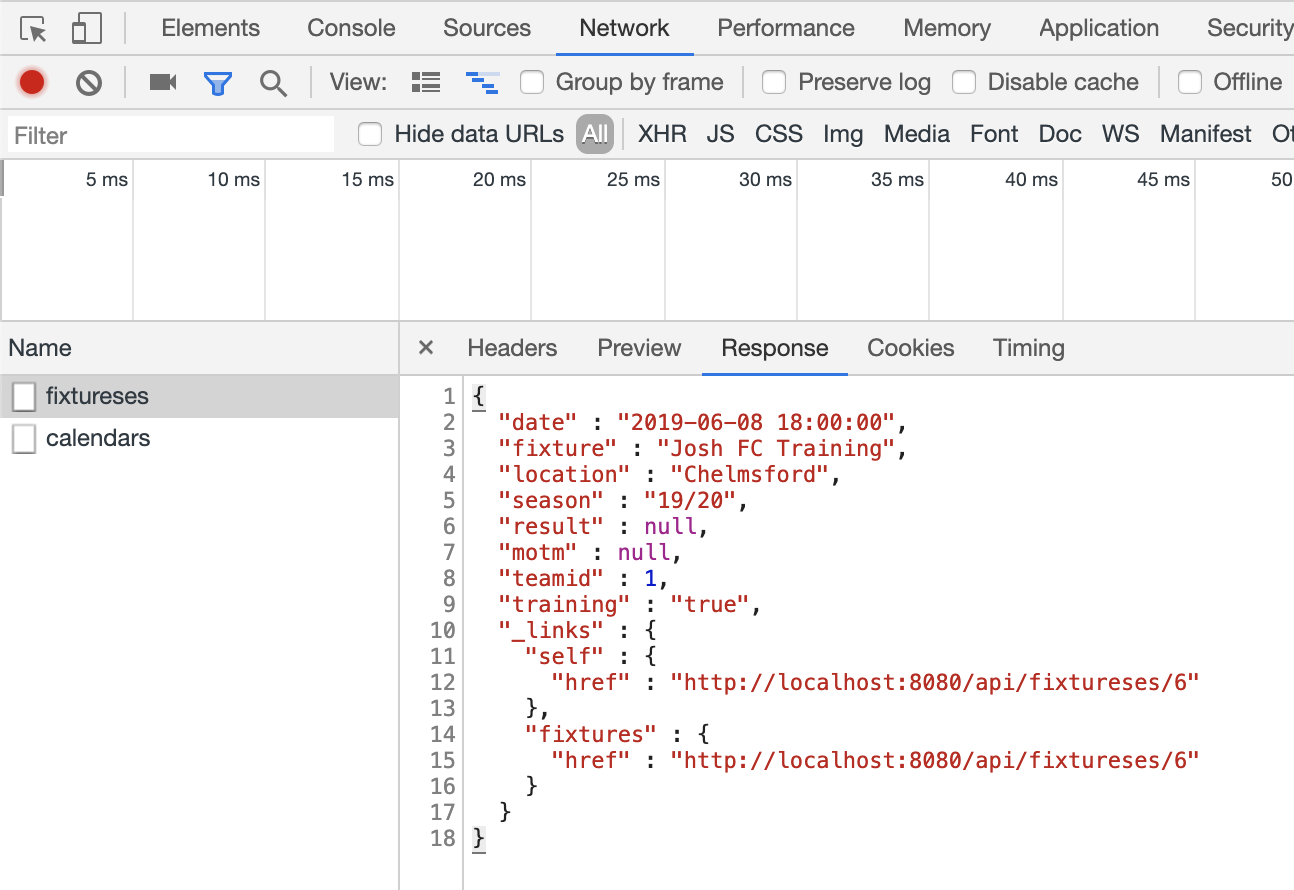
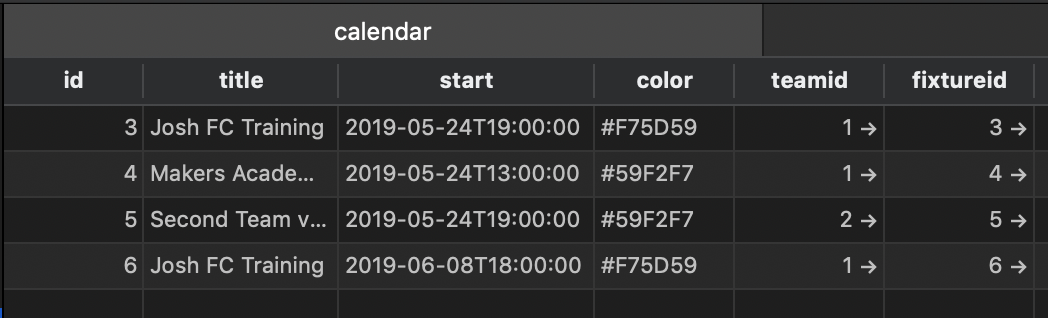
The response was giving me back all the information, including the fixture ID, 6 in the above case. Now I knew where it was, I could set it to a variable and then use that when POSTing to my calendar database!
Delete Players
This was the same issue as with deleting fixtures after someone had ticked their availability. I fixed it in the same way this morning.
Todays song of the day

 Josh's Blog