

Final Week
3 More Days
We only have 3 more days to work on our final projects including today. After Wednesday it is all about bug fixes and prep for our presentations. I think we have made good progress in the week and a half we have had, I am not sure we will finish everything, but we will have the majority of what we wanted finished.
Availability
So on Friday I got the availability check boxes working, and today I had to make it so you could uncheck them and delete info from the database, and also make it so boxes were pre-checked for those who had already confirmed. Previously the box was always un-checked, so could be checked again to add someone endless amounts of times, and un-checking them would not even delete that entry!
I started with making un-checking delete the entry in the db. I used the same onChange method I had used for POST to check, passing the event through to another method. One of the options for the event was to check if it was checked or not, which returned true or false. Using this I could get it to only POST if checked was false and DELETE if checked was true. Once I worked this out the actual fetch was easy!
fetch('/api/availabilities/search/findByFixtureidAndUserid?fixtureid='+ this.state.nextFixtureID +'&userid='+ this.state.userid, {
                method: 'GET',
                headers: {
                'Content-Type': 'application/json',
                },
                credentials: 'same-origin'
                }).then((response) => {
                     if(response.ok) {
                       return response.json();
                     } else {
                       throw new Error('Server response wasn\'t OK');
                     }
                   })
                   .then((json) => {
                     var availabilityID = (json._embedded.availabilities[0]._links.self.href.split("/")[json._embedded.availabilities[0]._links.self.href.split("/").length-1]);
                     fetch('/api/availabilities/'+ availabilityID, {
                                                    method: 'DELETE',
                                                    headers: {
                                                      'Accept': 'application/json',
                                                      'Content-Type': 'application/json',
                                                    },
                                                  });
                   });
I had to do two fetches, one to find the ID of that specific entry in the database, and then one to delete it!
Now I had to get it to set the state before rendering depending on what was in the db. To do this, I changed the way the class was working. Originally all the rendering was happening in the class, but to get it to work the way I wanted, I knew I would need to separate it out, like I had with fixtures previously. This would allow me to map my array of availabilities one by one into this second class, check the state, set it accordingly, then pass it back to the main table to be rendered. The CSS is still a bit off for some reason, but we are going to deal with that at the end if we have time!


Once I had this working, we decided we wanted to get our landing page looking nicer. I started with adding the calendar in. Then I added in a table with the next two matches, then finally added the availabilities in the bottom right, with an option to tick if you are available.
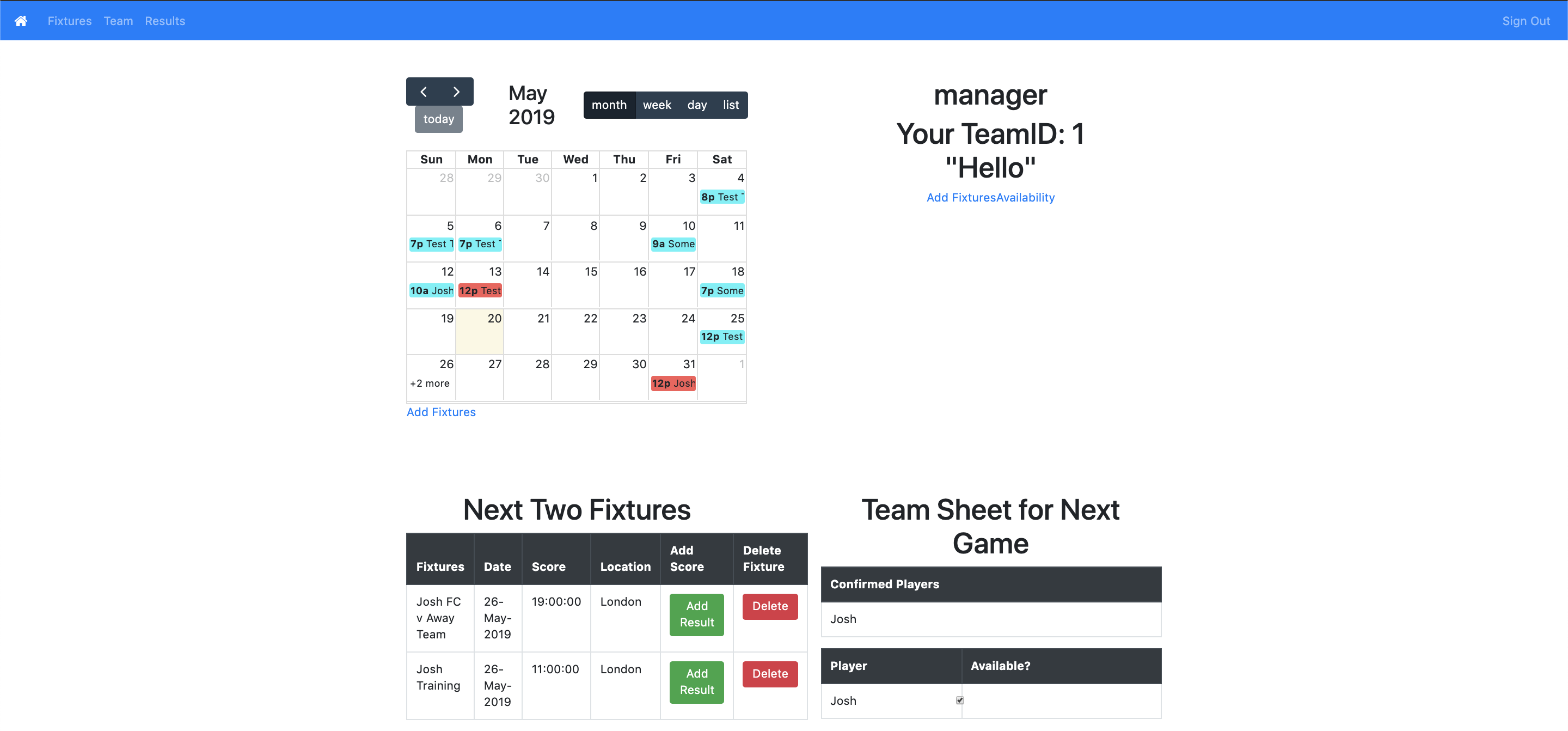
To get the next two fixtures, I created a separate class that worked the same way as getting the next fixture, which we did for availability, the only difference being I kept the first two in the array. The team sheet was fairly easy to get in, as was the availability checkbox, as I just passed the current user into the new availability class.
Weather
The rest of the team worked on calling to an open weather api to get a weather forecast. They were able to get a form to render on the landing page which asked for where you wanted to check, then showed the details. I took this and added it to the bottom of the next fixtures bit, to show the weather at the location of the next fixture. At the moment for some reason it is not rendering properly, I think because the location is not being set at the right point, however I think I am close to fixing this! Hopefully tomorrow we will have it working. Once that is done, we are pretty much done with our MVP, which may not sound like much considering it needs to be done on Wednesday, but I think our MVP was probably a bit too ambitious!
Todays song of the day:
 Josh's Blog