

Finishing Algorithms
Frequency
Yesterday we started looking at writing an algorithm to find the most common elements of an array. It was easy enough to write code to find the most common element, however if two elements were both the most common, it would only show one. To fix this I wrote the following code:
    static Object frequency(ArrayList<Integer> array) {
        ArrayList b = new ArrayList();
        Map<Integer,Integer> map = new HashMap<>();
        for(int i=0; i < array.size(); i++) {
            Integer count = map.get(array.get(i));
            map.put(array.get(i), count == null ? 1 : count + 1);
        }
        for(int j=1; j <= map.size(); j++) {
            if(map.values().toArray()[j-1].equals(Collections.max(map.values()))) {
                b.add(map.keySet().toArray()[j-1]);
            }
        }
        return b;
    }
The first for loop runs through the array and maps the numbers into a hash map with the count of how many times they appear. For example [1, 1, 2, 3, 3, 3, 3] would map to {1=2, 2=1, 3=4}. The second for loop then runs through these values and checks if they are the same as the maximum value. If so it adds that number to a new array. In this case, the maximum value is 4, as 3 appears four times, so 3 is put into the array. This new array is returned showing us the most common number. If the hash was {1=2, 2=2, 3=2} all three values would be equal to the maximum, so all of them would be placed in the new array.
This formula worked as intended, and ran fine for a small amount of variables. However like the duplicates algorithm from yesterday this is O(n²), so trying to run it with a high array size simply doesn’t run. I couldn’t find a fix yesterday at Makers, so when I got home I carried on trying different things determined to fix it. Mostly I was trying to eliminate the need for the second for loop, I tried lots of different things to get it to work but I just couldn’t solve it. Most methods were fine for finding one maximum number, but more than one just wouldn’t work. About 10pm I had a brain wave.
Optimisation
If the hash was sorted by value, the number that appears most would always be at the end. In that case it would be simple to just pop out the last number and put it into another array. Some quick googling led me to this method for sorting a hash map by its values:
Map<Integer, Integer> sorted = map
                    .entrySet()
                    .stream()
                    .sorted(comparingByValue())
                    .collect(
                            toMap(Map.Entry::getKey, Map.Entry::getValue, (e1, e2) -> e2,
                                    LinkedHashMap::new));
To be perfectly honest I don’t 100% know what this is doing. I can see that a new hash map is being created called sorted, and it is being set equal to map with a load of other stuff happening. The bit at the bottom seems to be comparing two values and I suppose swapping their entry depending one which is higher. I will try to do some research on this later!
Now I had a sorted hash of values, for example [1, 1, 2, 2, 2, 3, 3] would return {1=2, 3=2, 2=3}. I had to figure out a way of removing the last element, and also checking that there were no more elements that matched the maximum value in case of multiple numbers being the most frequent ({3=2, 1=3, 2=3} for example). To get this working I wrote a while loop that compared the values in the sorted hash map against the maximum from our map hash map. This meant that while the sorted hash map contained the maximum value, it would remove the last element, as soon it didn’t the loop would stop.
while(sorted.containsValue(Collections.max(map.values()))) {
// code
}
Inside this loop, all I had to do was move the last key of the sorted hash map into my new array. This sounded easy, however it was a little more complex. Running sorted.keySet() would return an array of the keys, so {3=2, 1=3, 2=3} would return [3, 1, 2]. However there was no way of accessing the elements in this array, usually adding .get(i) or [i] after the array lets you access the element at position i, but it wouldn’t work after the .keySet function. So I had to convert sorted.keySet() into its own array, then use .get() to get the last element from that array:
Arrays.asList(sorted.keySet().toArray()).get(sorted.size()-1)
Then I added this to a new array called c (not sure why I called it c). The last thing I had to do was remove the key I just added into c from the sorted hash map, or else it would loop forever, constantly putting that element in. This would also allow me to look at the next element in to see if that also matched the maximum. To do this I had to do sorted.remove("KEY"), with "KEY" being the number I just added to c, which gave me this:
sorted.remove(c.get(c.size()-1));

// c.get(c.size()-1) returns the number in the last position of array c, which is the number we just added.
This gave me the final code of:
static Object frequency(ArrayList<Integer> array) {
        ArrayList c = new ArrayList();
        Map<Integer,Integer> map = new HashMap<>();
        for(int i=0; i < array.size(); i++) {
            Integer count = map.get(array.get(i));
            map.put(array.get(i), count == null ? 1 : count + 1);
        }
        Map<Integer, Integer> sorted = map
                    .entrySet()
                    .stream()
                    .sorted(comparingByValue())
                    .collect(
                            toMap(Map.Entry::getKey, Map.Entry::getValue, (e1, e2) -> e2,
                                    LinkedHashMap::new));
        while(sorted.containsValue(Collections.max(map.values()))) {
            c.add(Arrays.asList(sorted.keySet().toArray()).get(sorted.size()-1));
            sorted.remove(c.get(c.size()-1));
        }
        return c;
    }
I was so happy when this finally worked!
It is now O(n), although it still takes longer to run than the others, but with 1million numbers in the array it’s not surprising. Originally I was sorting the array before running the frequency code, however with this method that actually isn’t necessary. Removing that took about 3 seconds off of the total run time of the method (although it was outside of the time plotted on the graph so didn’t effect that).
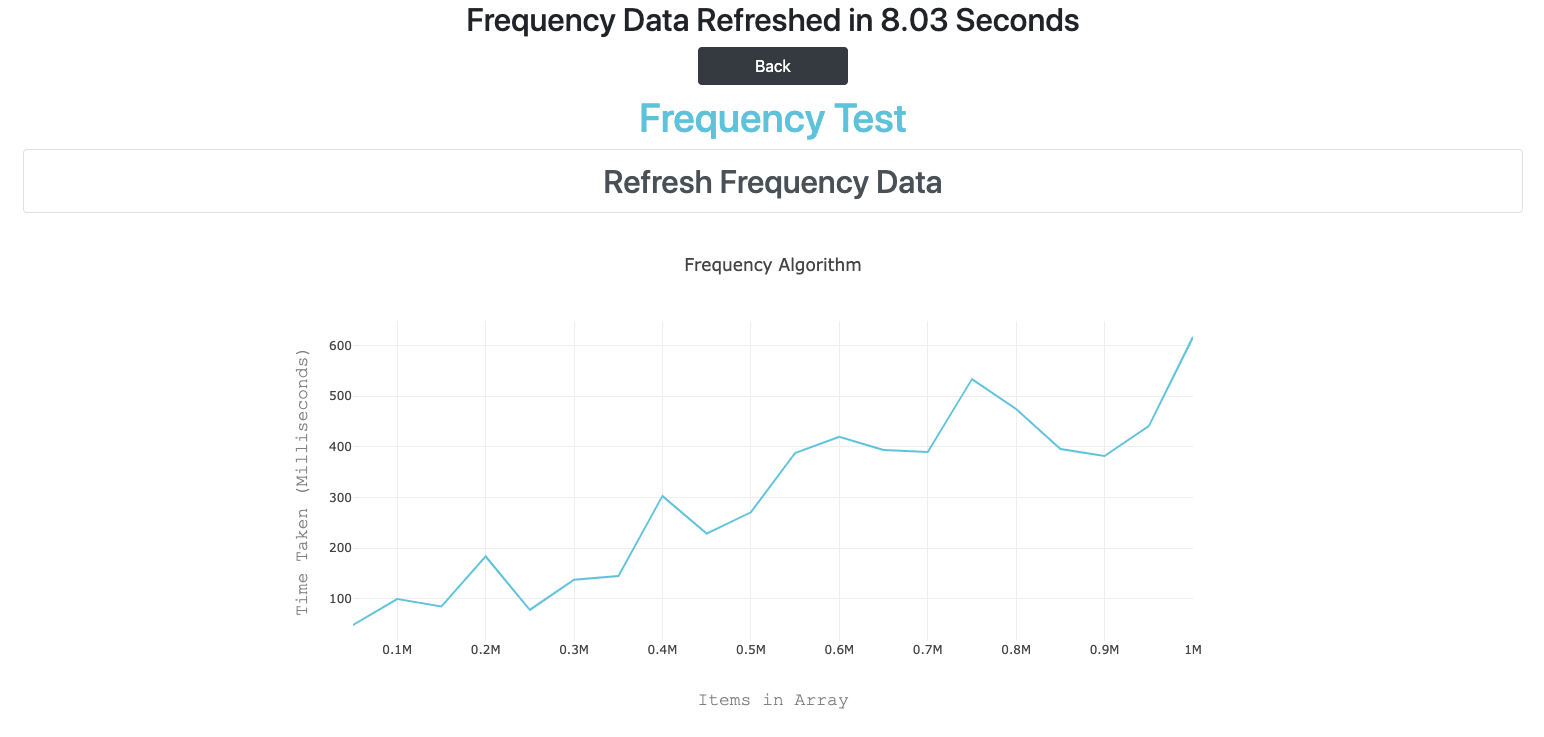
I think that is the final touch for this web app, so here is the build status and a link to the site once again!

Big O Presentation
Today we were asked to put together a presentation on Big O and the tests we had done. I found a lot of useful, easy to read information here. I combined this info with our own results to create the below presentation.
Todays song of the day

 Josh's Blog