

Even More Java
Java Terms
In the Java we have done so far, there is a lot of use of static and void in our methods. I have a basic understanding of them, but wanted to give a bit more detail on them:
staticis a keyword used to describe how objects are managed in memory. It means that the static object belongs specifically to the class, instead of instances of that class. Variables, methods, and nested classes can be static. No matter how many instances of the class you create, the static object will not change. For example, if you wrote a book (our class in this case) and then sent it for print, the number of pages would be a static variable, as it would be the same for any instance of the classvoidis a keyword that is used to describe a method with no return value. If you wanted your method to return a number for example, you would replacevoidwithint. Trying to return something in avoidmethod would cause an error.publicis another keyword we have used a lot. It works in the same way as private did in Ruby. A class, method or variable can bepublicorprivate. If it isprivateit can only be accessed within the class it is in.ArrayListis how you create an array in Java. It would be defined as the below:
private static ArrayList<Plane> hangar = new ArrayList<Plane>();
Plane is the class the array is in, hangar is the name of my array. Creating the ArrayList allows us to use methods that we are used to from Ruby and JS, such as add and remove.
Spring Boot and Thymeleaf
I briefly mentioned that we used these two yesterday, but didn’t give much of an explanation of what they are, so here it is!
Spring Boot
Spring Boot is part of the Spring Framework developed by Pivotal. The Spring Framework provides foundational support for different application architectures, including messaging, transactional data and persistence, and web.
Spring Boot provides a simpler and faster way to set up, configure, and run both simple and web-based applications. It is similar to Sinatra in Ruby, in that it allows us to easily create a local server to host a web app that we are working on and run the app.
This article does a good job of explaining it in a bit more detail.
Thymeleaf
Thymeleaf is a Java HTML template engine. This means that it can read a Java file (model) and an HTML file (view), and combine the two to generate what will be seen, for example on a web page.
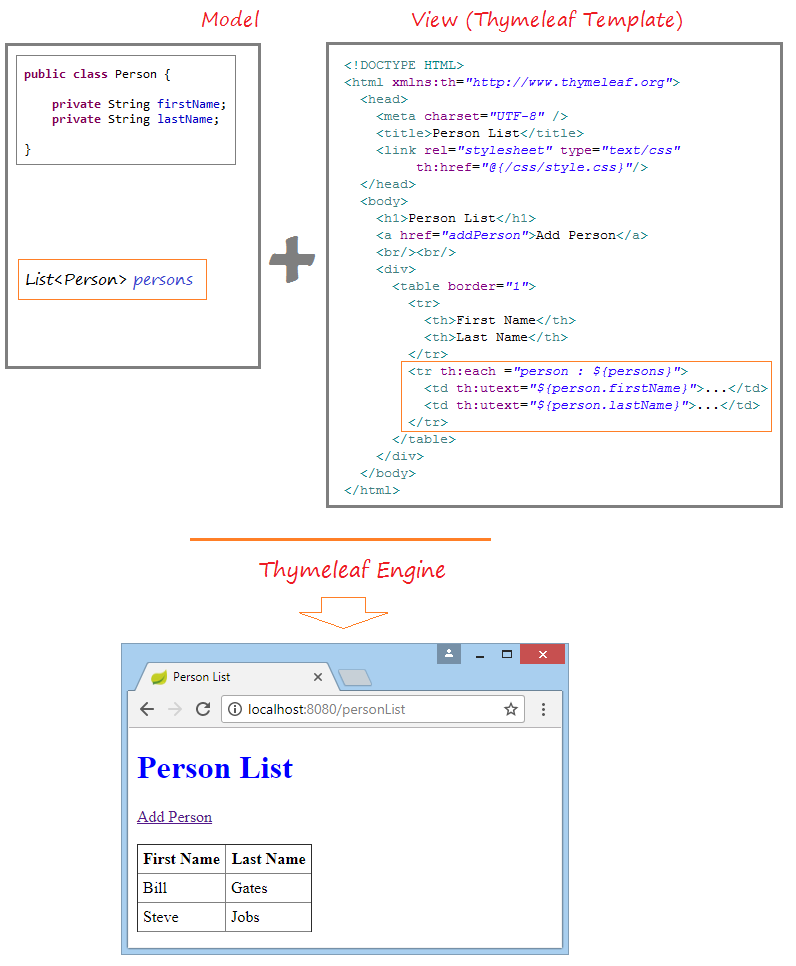
In the above example, our Java class is just defining two String Variables; firstName and lastName. It is then adding them into an array called persons.
The HTML file has all the normal HTML stuff on it, but the Thymeleaf bit is in the orange box. The th: bits are Thymeleaf, and they tell the engine that these bits of information will be changing, as they are customisable. th:each ="person : ${persons}" is telling it to go through each part of the array, with the next bit separating first and last name.
Thymeleaf looks at the HTML and sees that there are th: elements, and looks at the Java to see what those elements need to be. It puts them together to display the above webpage.
CRUD
One of the tasks set for us today is to develop a CRUD application using Spring boot and Thymeleaf. I had no idea what CRUD meant, so looked into it, and it’s actually something quite simple that we have done a few times already! CRUD stands for Create, Read, Update, Delete, and is the basic functionality a model should have when building API’s.
Create – basically we should be able to create an instance of whatever it is we are dealing with. To carry on the book examples, we could have a book class, and we should be able to create a new instance of it with details like Book Title, Author etc.
Read – we should be able to view what we have created. This could be viewing all or just specific instances. So we could view all the books we have created, or could search for just one book by its name, or a group of books by author.
Update – as it sounds, we should be able to update the values of our created instances. For example if we spelt a name wrong.
Delete – also fairly straightforward, we should be able to delete entries too.
This Codecademy article is very good at explaining the concept and how it is achieved in a REST environment.
D
Twitch
I found a really interesting blog post by Twitch, the video streaming website, which talked about all the different languages and technologies that made their website work. Here it is for anyone interested!
Todays song of the day:

 Josh's Blog