

More on Databases and Finishing Bookmark Manager
Database Relationships
This morning we had a workshop about Databases and more specifically the relationship between tables within your database. The way were told to look at it was to take the user stories, draw those out into Class-Responsibility-Collaborator cards, then map these into database tables. Here are the examples:
User Stories
As a customer
So I can get a bicycle
I want to withdraw a bicycle from a docking station

As a customer
So I can complete my trip
I want to dock a bicycle back at a docking station

As a customer
So I can have the best cycling experience
I want to only get good bikes from the docking station

As an administrator
So I can tell how many bikes are at each docking station
I want to get a count of the number of bikes at the docking station
And this is how they planned them out:
CRC
|-----------------------------------|
|                Bike               |
|-----------------------------------|
| Responsibilities |  Collaborators |
|-----------------------------------|
| Knows if working |                |
|-----------------------------------|

|----------------------------------|
|         Docking Station          |
|----------------------------------|
| Responsibilities | Collaborators |
|----------------------------------|
| Release a bike   | Bike          |
| Dock a bike      |               |
| Count bikes      |               |
|----------------------------------|
Database Structure
Table: bikes
|-------------------|-----------------------|
|  id  |   working  |   docking_station_id  |
|-------------------|-----------------------|
|   1  |    true    |           1           |
|-------------------|-----------------------|

Table: docking_stations
|-----|
| id  |
|-----|
|  1  |
|-----|
We also talked about Foreign Keys in databases, which is something we used in our Bookmark Manager.
Bookmark Manager
In the context of relational databases, a foreign key is a field in one table that uniquely identifies a row of another table or the same table. So for example in my bookmarks table, I have a column called ‘user_id’. This is a foreign key, and identifies a row in my user table.


In terms of what I did today on the bookmark manager, I basically continued with the Post Challenge bits set for us. We were given the below things to work on:

I implemented the 2nd and 3rd points yesterday, so today I decided to tackle the first one. This was a little more complex than the other two.
The first thing I did was alter my bookmarks table in the database so it had a column for user_id. This way I could associate each bookmark with a user using the foreign key. To do this I just used the SQL command below in both my actual and test databases:ALTER TABLE bookmarks ADD COLUMN user_id VARCHAR(60);
I then had to adjust my code so that whenever a bookmark was created, it included the user_id in the data put into the database. I started by looking at what happens when creating a new bookmark, following the route from my controller, to find the method in my Bookmark class that is called to create the bookmark.
def self.create(url:, title:)
    return false unless is_url?(url)
    result = DatabaseConnection.query("INSERT INTO bookmarks (url, title, user_id) VALUES('#{url}', '#{title}') RETURNING id, title, url;")
    Bookmark.new(id: result[0]['id'], title: result[0]['title'], url: result[0]['url'])
  end
This had to be changed to accept user_id as an argument, pass that to the database and then add that into Bookmark.new at the end. Here is how it looks now:
def self.create(url:, title:, user_id:)
    return false unless is_url?(url)
    result = DatabaseConnection.query("INSERT INTO bookmarks (url, title, user_id) VALUES('#{url}', '#{title}', #{user_id}) RETURNING id, title, url, user_id;")
    Bookmark.new(id: result[0]['id'], title: result[0]['title'], url: result[0]['url'], user_id: result[0]['user_id'])
  end
I updated the controller to reflect this too, so when calling Bookmark.create, session[:user_id] was also passed in along with url and title.
I had to add user_id into the initialize method of Bookmark as it also needs to be included whenever I create a new instance of the class. This meant that anywhere I called Bookmark.new I had to add user_id in too, which was a lot!
Unfortunately this broke around half my tests, as currently anywhere a bookmark was being created, it wasn’t being done with a user_id. So anywhere that was currently running something like:
Bookmark.create(url: 'http://www.makersacademy.com', title: 'Makers Academy')
I replaced with a couple of web helper methods. This meant that rather than creating the bookmark directly in the database, and testing to see if the web app could retrieve it, I was instead running the whole process through the app. Here are the methods I used:
def sign_up
  visit '/'
  click_button 'Sign Up'
  fill_in(:email, with: 'test@example.com')
  fill_in(:password, with: 'password123')
  click_button 'Sign up'
end

def add_bookmark_makers
  click_button 'Add a Bookmark'
  fill_in(:url, with: 'http://www.makersacademy.com')
  fill_in(:title, with: 'Makers Academy')
  click_button 'Submit'
end
And an example of a test using them:
scenario 'A user can add a new bookmark to Bookmark Manager' do
    sign_up
    click_button 'Bookmarks'
    add_bookmark_makers
    click_button 'Submit'
    expect(page).to have_link('Makers Academy', href: 'http://www.makersacademy.com')
  end
I had to use the sign_up method due to a separate error that occurred. When the test is run, the tables in the test database are truncated (as I touched on a couple of days ago) which clears out all the data. However it does not reset the id’s, so a new id is given every time the test is run and information is added.

This means that I cannot set the user_id to a specific number, as the user_id will be constantly changing. The sign_up web helper gets around this as it signs a user up, generating the id, then uses that user when creating bookmarks. This means that although the id is changing, it is consistent with the one that created the bookmarks used in the test! So that fixed my tests, happy days.
Now that bookmarks were being created with an associated user id, I could use this to add the requested feature in. Bookmarks should only be seen by the user that added them, so every users experience is unique to them. To do this I altered the method that is called by the controller when it wants a list of bookmarks, Bookmark.all. The code originally was
def self.all
    #code here for setting test database, not important

    bookmarks = DatabaseConnection.query("SELECT * FROM bookmarks)
    bookmarks.map do |bookmark|
      Bookmark.new(
        url: bookmark['url'],
        title: bookmark['title'],
        id: bookmark['id'],
      )
    end
  end
Which I changed to:
  def self.all(user_id:)
    #code here for setting test database, not important

    bookmarks = DatabaseConnection.query("SELECT * FROM bookmarks WHERE user_id = '#{user_id}' ORDER BY id")
    bookmarks.map do |bookmark|
      Bookmark.new(
        url: bookmark['url'],
        title: bookmark['title'],
        id: bookmark['id'],
        user_id: bookmark['user_id']
      )
    end
  end
The change I made was to the SQL query, adding in a WHERE command which matched the user_id in the table to the user_id put in as an argument on the method. I changed my controller to Bookmark.all(user_id: session[:user_id]) to account for the change. Again this broke a few of my tests, but it was simple enough to fix them!
After the above changes, my tags were not working, as trying to display a tag would show links to any page tagged with that tag, no matter who had added the tag! In order for tags to behave the same way, I went through the same process of adding user_id to the table and to all the methods. It works too now and all the tests pass!
Now logging in does change the user experience, so I have fulfilled that request. The last one, is more about automating the experience of setting up the database if you were to try to re-create this project, so I don’t think I will bother with that one! Here is the finalised repo!
Black Hole
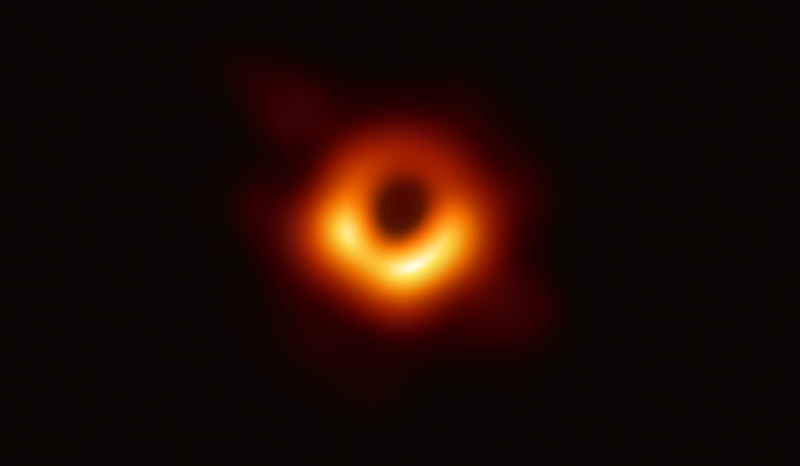
I wanted to mention the incredible achievement that was revealed yesterday by the Event Horizon Telescope team, the first picture of a black hole. I know it is everywhere at the moment, so to keep it relevant I wanted to talk about the sheer amounts of data it took to produce. That said I will start with a little explanation.
Basically, to capture the wavelengths of light given off by the M87 black hole, you would need an optical telescope with a diameter of around 12,000,000 meters, which is of course completely ridiculous. In order to capture the image, the Event Horizon Telescope (EHT) was set up by some very smart people all over the world. 8 telescopes around the world were linked up to capture data in sync, in order to cover the diameter necessary.
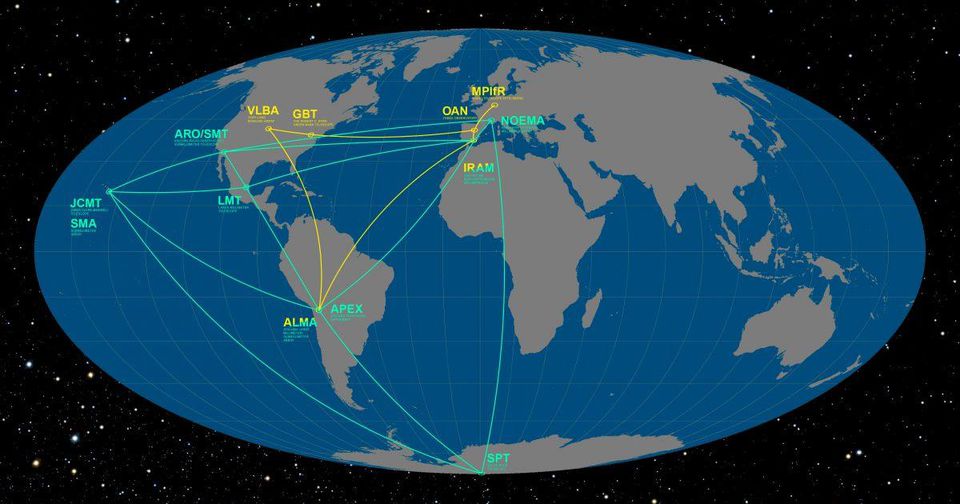
Here is where the data part comes in. The telescopes all had to record the full wave constantly. This equated to:
– 8GB a second per station, 64GB per second in total.
– 225TB an hour across all 8 stations.
– The one week observing run equated to 27PB (thats petabytes, or 1,000 TB).
– The black hole image itself equated to 5PB of raw data.
That is an insane amount of data, written at incredible speed. The hard drives the data was stored on were shipped from each of the locations to two central locations for processing, and the combined weight of the drives was almost half a ton! This kind of thing would not have been viable until very recently, as storage has become much more advanced and much cheaper. I came across an interesting article on reddit about this, showing how far memory had come since the 50’s.
The hard drives were physically shipped rather than digitally shared because it was just much faster. This post by Jason Snell explains it really well, here is probably the most interesting part.
Hawaii is 5,000 miles away from the MIT Haystack correlation facility. Let’s assume roughly 700 terabytes of data (one-seventh the total) is flying from Hawaii to Haystack. Let’s generously estimate it takes 14 hours to get 150 pounds of hard drives from the summit of Mauna Kea to MIT Haystack. That would mean they transferred 700 terabytes in 50,400 seconds, for a final data rate of about 14 gigabytes per second.
Jason Snell, https://sixcolors.com/
Even though the data from Antarctica couldn’t be shipped until the end of their winter, it was still quicker to wait than to try and upload it!
I couldn’t talk about all this amazing stuff without posting that picture, so here it is.
Todays song of the day was an obvious choice:

 Josh's Blog