

More Bookmark Manager
This morning I carried on working through the walkthrough for Bookmark Manager. It is getting really complex now, to the point where I would be pretty lost without the walkthrough, but as it was with Battle that is expected as it is all new stuff. By the Friday challenge last week I was fairly confident so hopefully the same will happen this week!
As I have just been following the walkthrough there isn’t loads to talk about today, but I will go through some of the new things I have learned yesterday and today!
<ul> => a tag in html. It stands for unordered list, and is exactly that, it denotes a list that isn’t ordered in any way. You use <li> within it to show each item in the list. More info here. w3schools is really good html resource in general.
PUT => PUT is an html method which is similar to POST. Where POSTis used to modify and update a resource, PUT is used to create a resource, or overwrite it. A lot of the time they can be used interchangeably, however, the big difference between PUT and POST is that PUT is idempotent: calling it once or several times successively has the same effect (that is no side effect), where successive identical POST may have additional effects, like passing an order several times. Useful info here.
PATCH => Another html method, it is similar to PUT, however it allows you to just replace one part of a resource, rather than the whole thing. Unlike PUT, PATCH is not idempotent, meaning successive identical patch requests may have different effects. Useful info here.
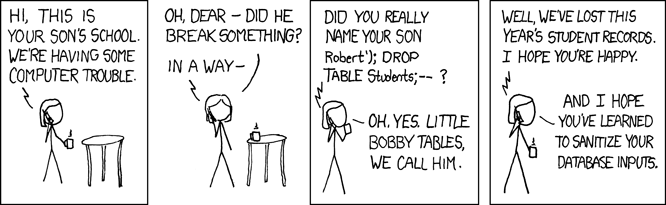
TRUNCATE => TRUNCATE is an SQL command that clears a database table of all its data. It is quite useful for testing where you want to clear your test database after every test so it doesn’t get clogged up full of rubbish data. You would run the command as TRUNCATE TableName;.
DROP => DROP is an SQL command that deletes a database table and all of its data. You would run it as DROP TABLE TableName;. Useful info on Drop and Truncate here. Learning this finally helped me understand some XKCD comics I had read over the years, like this one!
PostgreSQL => PostgreSQL (or Postgres) is a Database Management System, one of the most popular actually. It helps you interact with databases. We can install it as a gem in ruby. In the terminal we can run psql which will open it up and allow us to interact with our databases. Also we can use the gem in our code and call on it, for example PG.connect(dbname: ‘names’) would connect us to a ‘names’ database. Here is a bit more on what Postgres is.
Self => Self in Ruby is a bit tough to understand I think. This blog was fairly helpful in my understanding, but I was still a little confused. Basically self lets you refer to the current object you are looking at, as everything in Ruby is an object. I have tried to show how it works below:
I have made a class called Ghost which has two methods. One is self.reflect which just returns self. The other is scare which puts ‘Boo’. When I open my file in IRB, I can run Ghost.reflect and it will return self, which in this case is my Ghost object. I don’t have to create a Ghost class instance by running Ghost.new first as the method self.reflect knows to run it on the Ghost object itself. It knows to use the Ghost object

If I try to run scare however, it doesn’t work, as I need to create a Ghost class instance first.

Inputting g = Ghost.new creates a new instance of my Ghost class, which I can then run scare on. However I cannot run g.reflect as g is an instance of the class rather than the class object itself.

If I changed both methods to be self. then I could run Ghost.scare and it would work.

Also, I could use my self.reflect method to create my Ghost class instance and then run scare on that as below.

In our Bookmark program we have used self in a few of our methods. Mostly it is used to obtain information from the database before initializing the class, like below for comments on bookmarks. self.where is first running DatabaseConnection.query to get some information. This information is then mapped over and used to create our Comment class. The three arguments needed to initialize the class are taken from DatabaseConnection.query so using self lets you get this information first before initializing.

Hope that makes sense, it was a little tough to wrap my head around at first!
This afternoon I started a step that adds encryption to any passwords put into the database. I installed a gem called ‘bcrypt’ which manages the process of hashing and salting the password for you. Their GitHub page explains it in way more detail! I have got to the end of the steps for the Bookmark Manager now, so tomorrow I will work on the post challenge bits. Specifically I think I will look at using CSS to make it look pretty! I will also have another look over the practicals, and might start a random project, as last week the Birthday Greeter project was really helpful in my understanding writing web apps and using Capybara.
Todays song of the day:

 Josh's Blog